Set up your world
Add your people, sites, equipment and locations. Start with the part of your business that needs the most visibility.
HOW IT WORKS
Connect the things you work with to the information you work from.
Add your people, sites, equipment and locations. Start with the part of your business that needs the most visibility.
Use ihub QR signs and asset labels to connect the physical site to its digital records, and be alerted when equipment is due for recertification.
Review activity in the web dashboard and use reports to follow up with the right people.
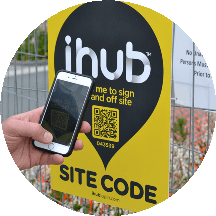
A PHYSICAL LINK TO A DIGITAL RECORD
Place a site sign where your crew arrives. Add labels to equipment that moves between jobs. Each QR code gives your team a practical starting point for the relevant ihub record.
Explore signs & labelsGETTING STARTED
Choose one priority: site attendance, equipment visibility or connected safety records. We can walk through the relevant setup with your team.
Yes. The web dashboard provides access to your organisation’s records, management tools and reports.
QR signs and equipment labels connect physical sites and assets to ihub. Talk with us about the label type and placement for your work environment.
Contact Joel to discuss your organisation, required features, signs and labels, and current pricing.
LET’S GET TO WORK
Tell me what you manage and I’ll show you how ihub could help.